

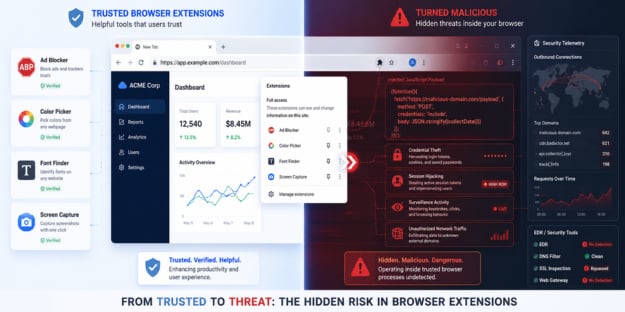
A browser-extension campaign is bypassing traditional EDR defenses by injecting remote JavaScript payloads directly into authenticated browser sessions.
Researchers at 7AI uncovered the operation, dubbed CRXfiltrate, after observing suspicious outbound traffic originating from a seemingly harmless Chrome color-picker extension.
According to the researchers, the campaign remained active across enterprise environments and delivered operator-controlled payloads without triggering alerts from multiple security layers.
“This started as a color picker with broader permissions than it needed,” said Juliana Testa, Senior AI Security Engineer and Threat Researcher at 7AI, in an email to eSecurityPlanet.
She added, “Sixteen months later, what we’ve documented is a 22-extension network with 85,000+ installs, 60+ active operator domains, an undocumented JavaScript execution backdoor that runs inside every page the user visits, and a delivery path that reaches victims without any extension installed at all.”
Key Takeaways from 7AI’s Research
- A malicious browser-extension campaign was discovered capable of bypassing traditional EDR defenses by injecting JavaScript payloads directly into authenticated browser sessions.
- The CRXfiltrate campaign disguised malicious extensions as legitimate browser utilities such as ad blockers, color pickers, and screen-capture tools.
- The extensions bypassed Chrome Manifest V3 protections by stripping browser security controls and delivering attacker-controlled payloads through remote configuration data.
- The infrastructure could support credential theft, session hijacking, surveillance, and attacks against authenticated enterprise applications.
- The campaign exposes visibility gaps in traditional security tooling, as much of the malicious activity operated entirely within legitimate browser traffic and processes.
Inside the CRXfiltrate Browser Extension Campaign
The campaign highlights how browser extensions are increasingly becoming powerful attack vectors capable of bypassing many traditional enterprise security controls.
Threat actors disguised malicious extensions as legitimate tools such as ad blockers, screen-capture apps, font finders, and color pickers.
These applications appeared harmless to end users but requested broad browser permissions that granted access to activity across virtually every website visited by the victim.
How the Browser Extension Attack Worked
Once installed, the extensions manipulated core browser security mechanisms to create a stealthy browser-based remote code execution environment.
According to the 7AI research, the malicious extensions leveraged Chrome’s declarativeNetRequest API to strip important browser protections such as Content-Security-Policy (CSP) and X-Frame-Options headers from webpages.
By removing those protections, the extensions retrieved attacker-controlled payloads that executed directly inside authenticated browser sessions.
Researchers said the technique bypassed Chrome Manifest V3 protections by disguising remote code as configuration data before converting it into executable browser-side payloads.
Beyond Ad Fraud: Credential Theft and Surveillance Risks
The investigation found that the campaign’s primary observed payload focused on search-engine advertising fraud targeting users of Google, Bing, and Yahoo.
Researchers warned the infrastructure could support credential theft, session hijacking, surveillance, and attacks against authenticated enterprise applications far beyond simple ad fraud.
Researchers also uncovered evidence of identity harvesting within some payload variants.
In some cases, the extensions harvested signed-in Google account names and email addresses from active browser sessions.
Combined with browsing telemetry and user activity data, the operators could potentially build detailed profiles tied to real user identities.
Concerns Around Browser Extension Trust and Validation
Another concerning discovery involved the Chrome Web Store itself.
During the investigation, researchers identified at least one malicious extension carrying Google’s Featured badge despite exhibiting malicious behavior.
Although the extension was tied to a separate threat actor, the finding raised broader concerns about weaknesses in browser-extension validation and marketplace trust systems.
Traditional Security Tools Missed the Campaign
One of the most significant findings from the research involved the campaign’s ability to evade traditional enterprise security tooling.
Researchers said the malicious activity operated entirely within legitimate browser processes without triggering traditional malware behaviors such as dropped files, suspicious processes, or persistence mechanisms.
The campaign bypassed multiple enterprise defenses, including EDR, SSL inspection, DNS filtering, and cloud web gateways.
Researchers found that although some EDR platforms captured suspicious telemetry tied to the malicious infrastructure, the activity generated few meaningful alerts and was never escalated to analysts.
Researchers said the issue reflects a broader visibility gap, as many traditional security tools struggle to detect browser-based attacks operating within legitimate traffic and JavaScript environments.
Reducing Risk From Malicious Browser Extensions
The research highlights how browser-based attacks are creating new visibility and detection challenges for enterprise security teams.
Because malicious browser extensions can operate entirely within legitimate browser processes, organizations may need to expand security strategies beyond traditional endpoint protections.
- Inventory browser extensions across enterprise systems and restrict installations to approved allowlists using enterprise browser policies or MDM controls.
- Review extensions requesting broad permissions such as
, native messaging access, or excessive browser API privileges that do not align with their stated functionality. - Continuously monitor browser and network telemetry for suspicious extension behavior, CSP tampering, unusual outbound traffic, and known indicators of compromise.
- Strengthen identity protections with phishing-resistant MFA, conditional access policies, and isolated browser environments for privileged users and sensitive workflows.
- Conduct regular audits of installed browser extensions to identify risky updates, publisher ownership changes, or newly requested permissions.
- Improve employee awareness training around malicious browser extensions, fake utility applications, and browser-based phishing risks.
- Test incident response plans, use attack simulation tools with scenarios around browser-based attacks, and conduct proactive threat hunting.
These measures can help organizations build resilience and reduce exposure to browser-based threats.
Browser-Based Attacks Are Growing
The CRXfiltrate campaign shows how threat actors are increasingly abusing trusted browser ecosystems instead of relying solely on traditional malware delivery.
As enterprises and SMBs rely on browser-based applications and cloud services, browsers are becoming a more attractive target for attackers seeking access to authenticated sessions and sensitive data.
The findings highlight the need for stronger browser security controls and improved monitoring to detect threats operating within legitimate browser activity.
As browser-based threats continue evolving, organizations are turning to zero trust strategies to help secure user sessions, applications, and access to sensitive data.
