

Microsoft has released the March 2026 Patch Tuesday updates for Windows 11, addressing 83 security vulnerabilities and introducing reliability improvements across several core components.
The cumulative update KB5079473, released earlier, upgrades systems to Windows 11 builds 26200.8037 (version 25H2) and 26100.8037 (version 24H2).
Among the patched flaws are two zero-day vulnerabilities that had been publicly disclosed before fixes became available.
The first, CVE-2026-21262, is an elevation-of-privilege flaw in Microsoft SQL Server due to improper access controls. According to Microsoft’s advisory, a network attacker with low privileges could exploit the vulnerability to gain SQL Server sysadmin privileges, effectively granting full administrative control over the database environment. The flaw carries a CVSS score of 8.8 and can be exploited over a network without requiring user interaction.
The second zero-day, CVE-2026-26127, affects .NET and allows attackers to trigger a denial-of-service condition through an out-of-bounds read vulnerability. An unauthenticated attacker could exploit the flaw remotely to crash services relying on the affected .NET components. Microsoft rated the issue with a CVSS score of 7.5, noting that exploitation is currently considered unlikely but possible.
Microsoft also flagged six vulnerabilities as having a higher likelihood of exploitation, all of which allow attackers to elevate privileges locally after gaining initial access to a system.
These include flaws in several critical Windows components:
- CVE-2026-23668 – Microsoft Graphics Component elevation-of-privilege vulnerability discovered by Marcin Wiazowski working with TrendAI Zero Day Initiative. The bug involves a race condition in shared resources that could allow attackers to obtain administrative privileges.
- CVE-2026-24289 – Windows Kernel use-after-free vulnerability that could grant SYSTEM-level privileges.
- CVE-2026-24291 – Windows Accessibility Infrastructure (ATBroker.exe) privilege escalation vulnerability discovered by James Forshaw of Google Project Zero.
- CVE-2026-24294 – Windows SMB Server authentication flaw allowing local privilege escalation.
- CVE-2026-25187 – A Winlogon vulnerability involving improper link resolution that could also grant SYSTEM privileges, again reported by James Forshaw.
- CVE-2026-26132 – Another Windows Kernel use-after-free issue allowing elevation to administrator privileges.
While these flaws require local access to exploit, they are particularly valuable to attackers after an initial compromise, allowing them to escalate privileges and move deeper into compromised systems.
Improvements and reliability fixes
In addition to security patches, KB5079473 introduces several quality and reliability improvements across Windows 11.
One change enhances Secure Boot certificate deployment by adding additional device-targeting signals to ensure eligible systems automatically receive updated certificates during a controlled rollout. This comes ahead of a planned Secure Boot certificate expiration beginning in June 2026, which could otherwise prevent certain devices from booting securely if certificates are not updated.
The update also improves File Explorer search reliability, particularly when searching across multiple drives or the entire “This PC” scope. Microsoft further refined Windows Defender Application Control (WDAC) behavior so that COM objects are correctly allowed when allowlisting policies are configured.
Another improvement targets Windows System Image Manager, which now displays a warning dialog when selecting trusted catalog files, helping administrators confirm that configuration files originate from legitimate sources.
Microsoft also updated several internal Windows AI components, including Image Search, Content Extraction, Semantic Analysis, and the Settings Model.
Finally, the release includes Servicing Stack Update KB5083532, which improves the reliability of the Windows Update infrastructure responsible for installing future updates.
Microsoft states that it is not currently aware of any known issues affecting devices after installing this update.
Apply the update now
As with all Patch Tuesday releases, it is recommended to install the updates as soon as possible.
Windows users can install the update by navigating to Settings → Windows Update → Check for updates, while enterprise environments can deploy the patches through WSUS, Microsoft Update Catalog, or other endpoint management platforms.
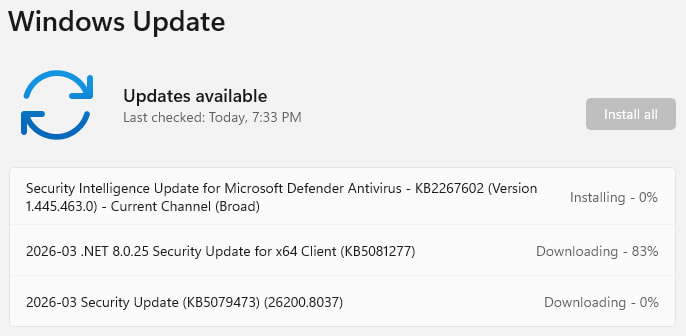
The updates will be automatically downloaded and installed, and a system reboot will be required for them to apply. It is advisable to back up important data before starting the process to prevent data loss.
If you liked this article, be sure to follow us on X/Twitter and also LinkedIn for more exclusive content.
