

editorially independent. We may make money when you click on links
to our partners.
Learn More
ESET researchers have uncovered a targeted Android spyware campaign using a fake dating app to lure victims into installing mobile surveillance malware.
The campaign, focused on users in Pakistan, disguises spyware as a chat platform that promises access to exclusive profiles but instead quietly exfiltrates sensitive data from infected devices.
“Once installed, the app silently exfiltrates sensitive data and actively monitors the device for new content, confirming its role as a mobile surveillance tool,” said the researchers.
“This campaign employs a method of deception that we have not previously seen in similar schemes – fake female profiles in GhostChat are presented to potential victims as locked, with passcodes required to access them,” said Lukáš Štefanko, security researcher at ESET in an email to eSecurityPlanet.
He explained, “However, as the codes are hardcoded in the app, this is just a social engineering tactic likely aimed to create the impression of exclusive access for the potential victims.”
Inside the GhostChat Spyware Campaign
The malicious application, dubbed GhostChat, was first observed in September 2025 after being uploaded to VirusTotal from Pakistan.
While it used the icon of a legitimate dating app available on Google Play, it did not replicate that app’s functionality. Instead, GhostChat served a dual purpose: it acted as the social engineering lure presented to victims and as the spyware implant operating in the background.
A Fake Dating App as the Initial Lure
Once installed, GhostChat requested a broad set of permissions and displayed a login screen designed to appear legitimate.
Unlike standard authentication workflows, however, the required credentials were hardcoded directly into the application and never validated by a remote server.
This indicates that the app and login details were likely distributed together by the threat actor as part of the initial lure.
After logging in, victims were presented with a list of female profiles, all marked as locked and requiring an access code to initiate a conversation.
These unlock codes were also hardcoded and appear to have been shared with victims in advance, reinforcing a sense of exclusivity and personal access.
Each profile was associated with a WhatsApp number using a Pakistani country code, strengthening the illusion that the profiles represented real local individuals.
Selecting a profile redirected the victim to WhatsApp, where conversations were initiated with numbers controlled by the attackers.
Data Exfiltration and Ongoing Surveillance
While the victim interacted with the app — or even before logging in — GhostChat immediately began exfiltrating data in the background.
Initial data collection included device identifiers, contact lists, and a wide range of stored files such as images, PDFs, and Microsoft Office documents.
Beyond this initial sweep, the spyware established persistent surveillance by monitoring newly created images and documents at regular intervals and automatically uploading them to a command-and-control (C2) server.
Related Desktop and WhatsApp Attacks
ESET’s analysis also uncovered activity tied to the same C2 infrastructure that extended beyond Android devices, pointing to a broader espionage operation.
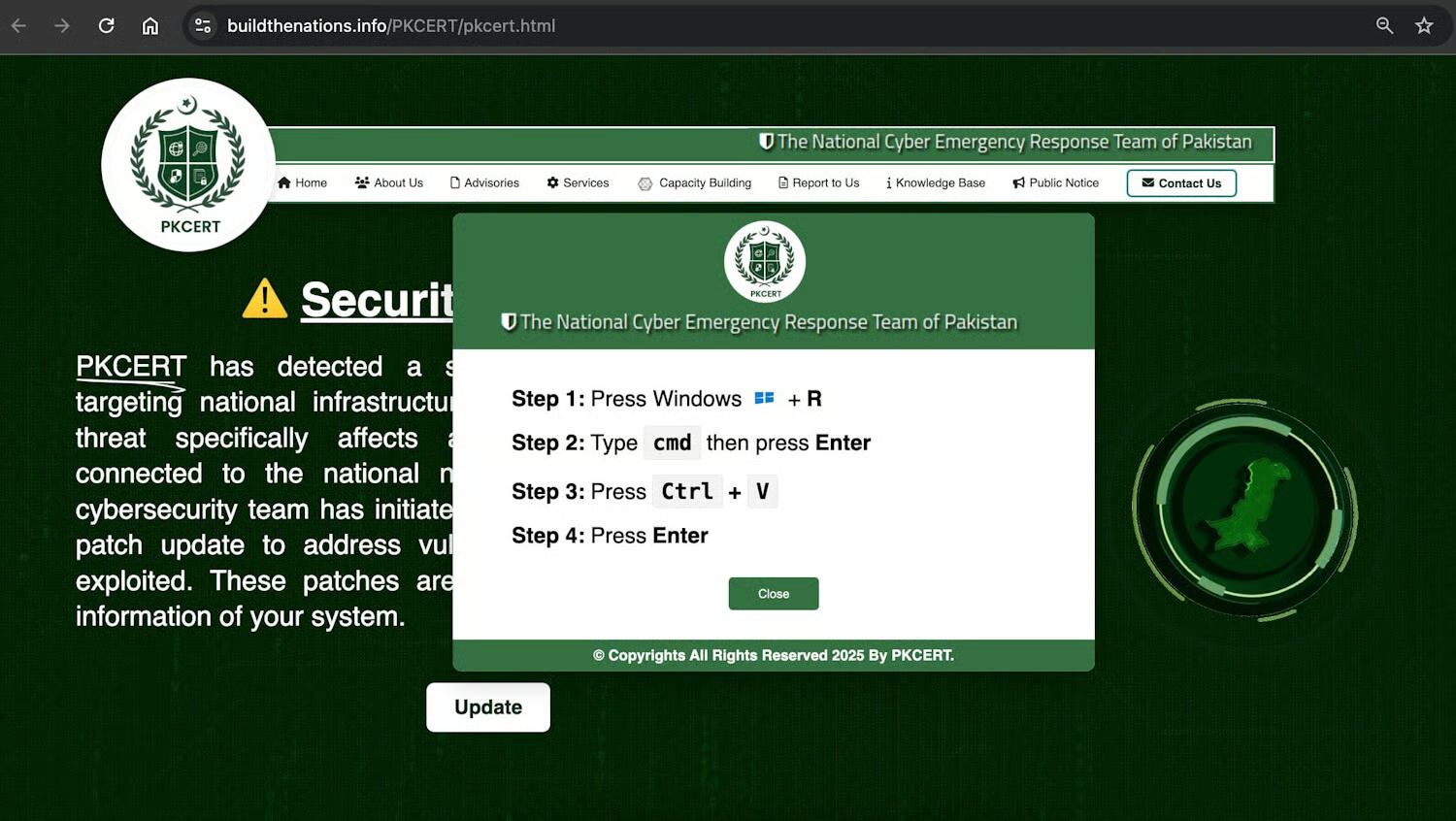
On the desktop side, the threat actor used a ClickFix attack, a social engineering technique that convinces users to manually execute malicious code.
Victims were directed to fake websites impersonating Pakistani government organizations, including a spoofed Pakistan Computer Emergency Response Team (PKCERT) page that displayed fabricated security alerts.
Following the on-screen instructions led users to download and execute a malicious DLL, which established persistent communication with the same C2 server and enabled remote code execution via attacker-supplied PowerShell commands.
Although the server appeared dormant during analysis, the infrastructure clearly supported ongoing control of compromised systems.
The campaign also targeted WhatsApp users through a device-linking attack commonly referred to as GhostPairing.
In this phase, victims were lured to fake websites impersonating the Pakistan Ministry of Defence and prompted to scan QR codes to join a supposed community.
By abusing WhatsApp’s legitimate link-to-device feature, the attackers gained access to victims’ chat history and contacts, effectively hijacking their messaging accounts.
Reducing Risk From Mobile Spyware
The GhostChat campaign shows how mobile spyware can blend social engineering with legitimate app features to quietly compromise devices.
Because these attacks often rely on user trust rather than just technical exploits, prevention requires more than a single control or policy.
Organizations should focus on limiting exposure, improving visibility into mobile activity, and preparing for account and device compromise.
- Avoid sideloading Android apps from unknown sources and treat exclusive access or preshared credentials as potential social engineering.
- Enforce mobile device management (MDM) or enterprise mobility controls to restrict sideloading, risky permissions, and unapproved apps.
- Deploy mobile threat detection tools and monitor for unusual network traffic or data exfiltration from mobile devices.
- Educate users on romance scams, impersonation tactics, and the risks of linking messaging apps to unknown devices.
- Require regular review of linked devices for messaging apps such as WhatsApp and investigate unexpected device-linking events.
- Monitor mobile app behavior for excessive permission use or access patterns inconsistent with stated functionality.
- Test and refine incident response plans for mobile spyware and social engineering campaigns, including device isolation and account recovery.
Collectively, these steps help limit the blast radius of mobile spyware incidents and build resilience against future social engineering-driven attacks.
The GhostChat campaign demonstrates how spyware can leverage social engineering, impersonation, and legitimate platforms to operate across mobile, desktop, and messaging environments.
Instead of exploiting just technical vulnerabilities, the attackers relied on trust and user interaction, which can make these activities harder to detect.
This reliance on implicit trust is one reason organizations look to zero-trust solutions to limit access and reduce risk.
