


Tuta has released official Thunderbird add-ons for its encrypted Mail and Calendar services, allowing users to access the Tuta web app directly from within Mozilla’s desktop email client.
The integration offers a workaround to longstanding compatibility limitations caused by Tuta’s end-to-end encryption architecture.
Because Tuta Mail and Tuta Calendar rely on built-in end-to-end encryption, they cannot be integrated into Thunderbird using standard protocols such as IMAP for email or CalDAV for calendars. Instead of protocol-level synchronization, Tuta developed dedicated Thunderbird desktop add-ons that embed secure web access to its services inside the email client.
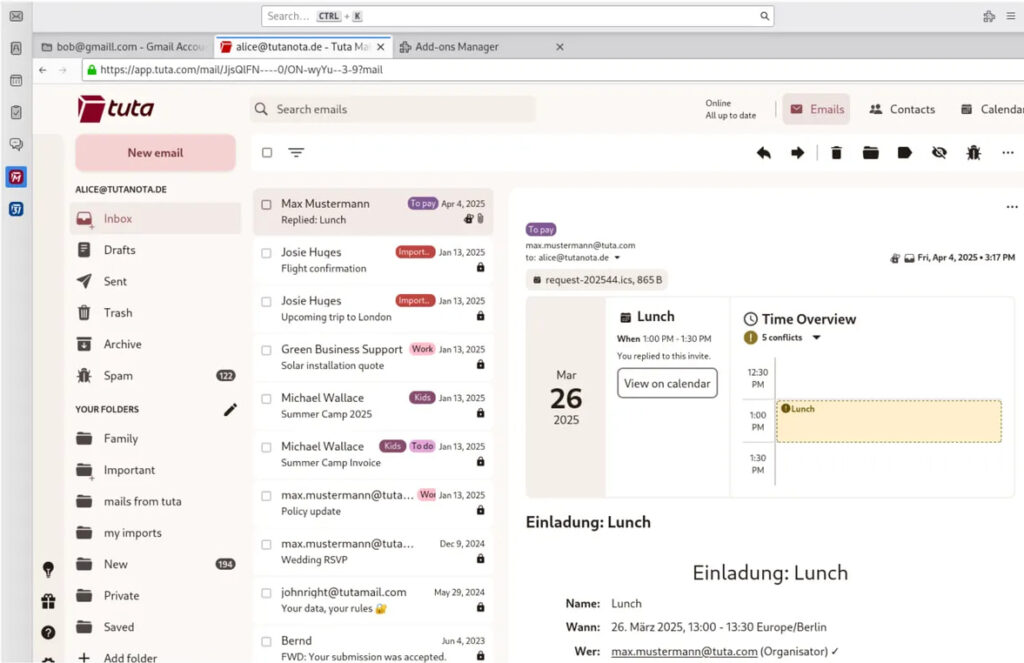
Following installation, users will see separate quick-access buttons for Tuta Mail and Tuta Calendar in Thunderbird’s “Spaces Toolbar.” Clicking either button opens the Tuta web app in a new Thunderbird tab, effectively running the encrypted service within the desktop client interface. Once logged in, users can save their credentials similarly to how they would in a browser session, and all standard web app functionality remains available.
Tuta, formerly known as Tutanota, is a Germany-based privacy-focused email provider offering end-to-end encrypted email and calendar services. The company positions itself as a secure alternative to mainstream providers, emphasizing open-source development and zero-access encryption that prevents even the service operator from accessing user data. Its encryption model, however, has historically limited interoperability with conventional mail clients that rely on open email and calendar standards.
Technically, the new Thunderbird add-ons do not enable native message synchronization through IMAP or CalDAV. Instead, they create a secure, sandboxed web app session inside Thunderbird, preserving Tuta’s encryption model without modifying its infrastructure. This approach avoids weakening cryptographic protections while still allowing users to centralize their workflow within Thunderbird.
The add-ons are available through the official Thunderbird Add-ons Store and can be installed directly from within the email client. Separate entries exist for Tuta Mail and Tuta Calendar. According to the company, support for Tuta Drive, its encrypted file storage solution, is expected to follow.
Tuta also notes several current limitations. Email import into the web app is not yet supported, meaning users cannot directly migrate messages from other providers via the Thunderbird add-ons. Drag-and-drop transfers of emails from Thunderbird to Tuta are also unavailable. Additionally, Thunderbird’s native notification system does not integrate with the Tuta add-ons at this time.
For users considering a full transition, Tuta continues to offer native desktop applications for Linux, Windows, and macOS. The company states that these clients provide improved search performance, along with email import and export capabilities that are not yet available in the web-based interface.
Tuta has released the Thunderbird add-ons as open-source software, consistent with its broader client ecosystem.
If you liked this article, be sure to follow us on X/Twitter and also LinkedIn for more exclusive content.
