


Mozilla has introduced encrypted automatic backups in Firefox 146 for Windows users, offering a new privacy-preserving way to safeguard passwords, bookmarks, and browsing data.
The feature allows users to restore their profile data across fresh installations, using a password-protected, daily local backup, without relying on cloud syncing.
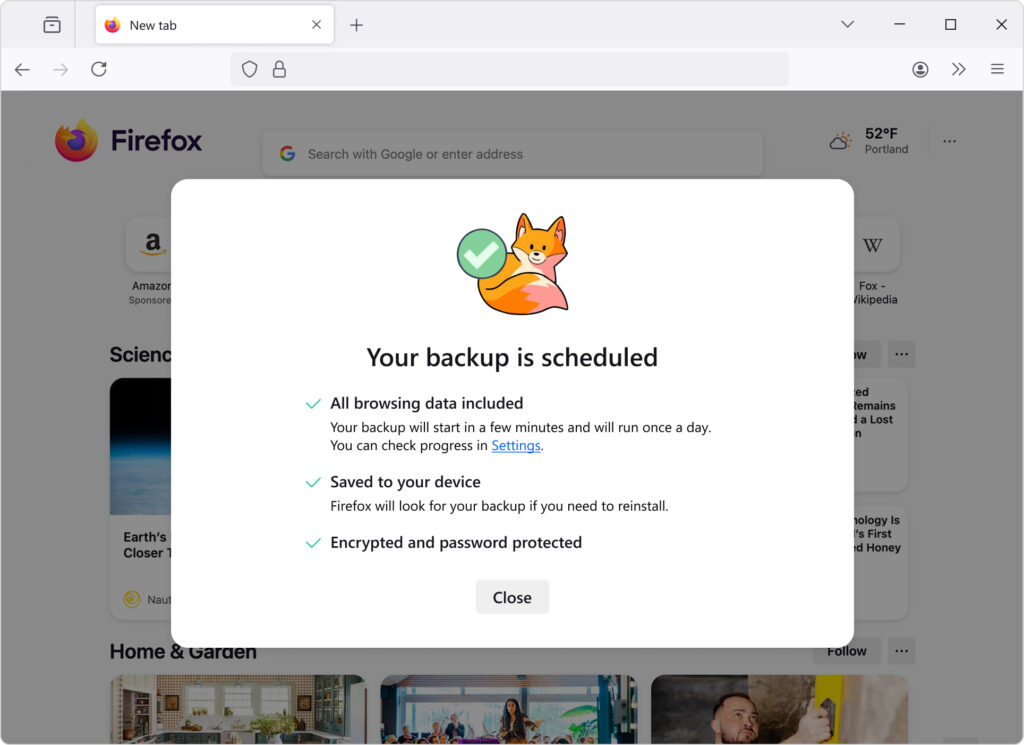
The new backup functionality was announced as part of the Firefox 146.0 release. At launch, it is only available for Windows 10 and later, with Mozilla stating that support for other platforms will follow. This is a progressive rollout, meaning the feature will become available to more users over time. The backups are encrypted locally with a user-defined password and stored on the device itself, aligning with Firefox’s privacy-first approach by avoiding cloud transmission unless explicitly chosen by the user.
Mozilla
The local encrypted backups are designed to work even if users don’t sign in with a Firefox Account, making this an attractive solution for users who prefer local control over their data or who avoid browser syncing services for privacy reasons. The feature provides continuity across device setups, enabling users to manually transfer their Firefox profile securely.
Alongside this feature addition, Firefox 146 addresses a significant number of security vulnerabilities, several of which are rated as high severity. These include:
- CVE-2025-14321: A use-after-free flaw in the WebRTC Signaling component
- CVE-2025-14322: A sandbox escape vulnerability in CanvasWebGL
- CVE-2025-14323: A privilege escalation issue in the Notifications component
- CVE-2025-14324 and CVE-2025-14325: Miscompilation bugs in the JavaScript JIT engine
In total, Mozilla patched thirteen CVEs in this release, including several memory safety bugs that could have allowed remote code execution under certain conditions.
While Mozilla’s new encrypted backup system offers a robust fallback in the event of data loss or reinstallation, users should be aware that encryption is only as strong as the password chosen. Also, Mozilla does not offer recovery options for lost backup passwords, so appropriate password management is recommended.
If you liked this article, be sure to follow us on X/Twitter and also LinkedIn for more exclusive content.
